
Accounts, sign in and support
AliceWin Help
Everything you need to run an AliceWin account from Britain: the two part sign up form, signing in and resetting a password, the profile panel, the support inboxes and the safer gambling options.
Sign up
Opening an AliceWin account
Registration is split into two short screens with nine fields in total, and most people finish in two or three minutes. Sign up runs on an email address, as no social login is offered. Players need to be adults of 18 plus, with a single account each.
Press the lilac Register button at the top, or the round Join Now in the dock on mobile.
Screen one: type an email and set a password.
Screen two: give your full name, birth date and mobile number.
Fill in street, postcode and city in the same form your bank uses.
Submit the form; confirming your email afterwards unlocks 10 free spins.
Enter your legal name and genuine address. At the first payout they are matched against your documents, and any difference holds the money back.
Sign in
Signing in and resetting a password
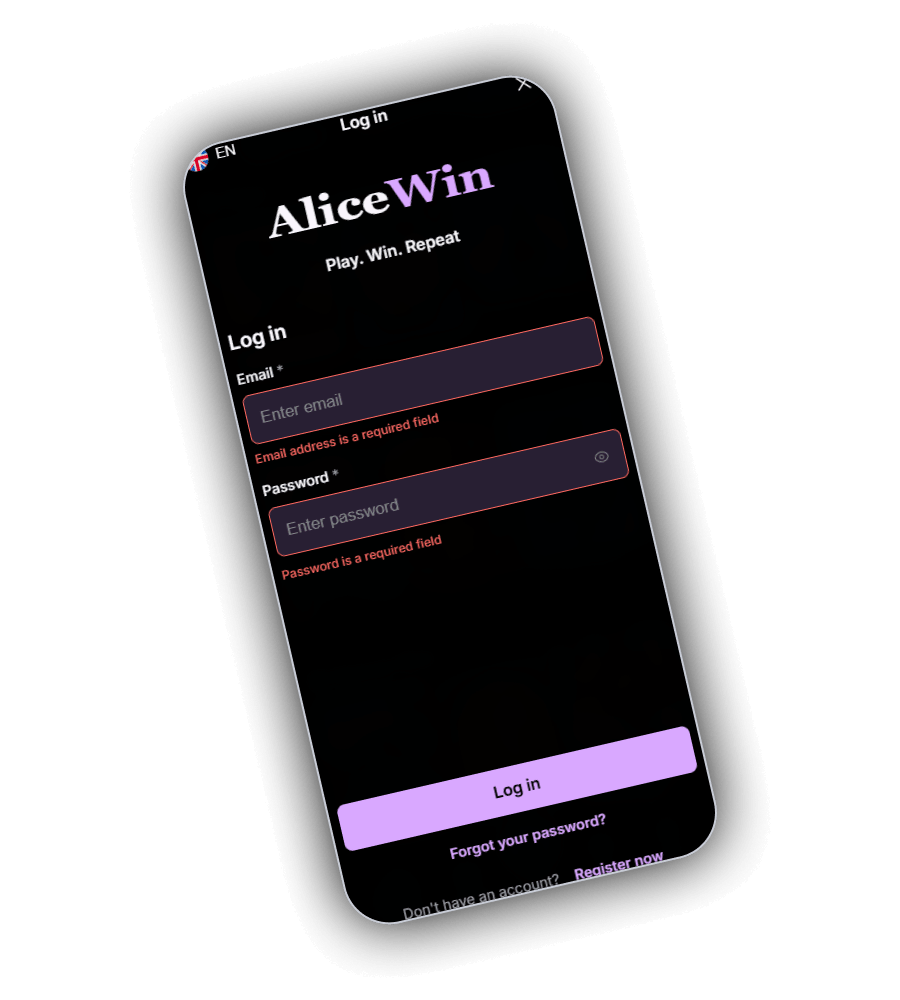
The Log in screen sits under the AliceWin logo and the Play. Win. Repeat. line. It asks for two things, the email you registered with and your password, and both fields are required. The lilac Log in button sends you back to the lobby, while Register now, lower down, leads to the sign up form.
Directly below the button is Forgot your password. Enter your email there and a reset link arrives in your inbox. No email after a while? Check spam or junk first, then contact support.
- Red text under a field means it is empty or the email format is wrong.
- AliceWin remembers your device and keeps you signed in, so avoid using it on a shared phone or computer.
- Keep this password unique to AliceWin.
Profile
What sits in your profile panel
Tap your avatar to open the side panel. From there you can reach every part of the account without going through the lobby.
| Section | What it holds |
|---|---|
| My Bonuses | Active and available bonuses, with the option to drop one |
| Transactions | Deposits and withdrawals with their status |
| Bet History | Your recent rounds and stakes |
| Personal Info | Name, address and contact details from registration |
| Verification | Upload space for ID, selfie and proof of address |
| Notifications | Messages from AliceWin about offers and your account |
| Your Rewards | The Verify Email card worth 10 free spins |
Deposit now, at the base of the panel, takes you straight to the cashier.
Support
How to reach AliceWin support
AliceWin support works by email. Questions on payments, bonuses, documents or the account go to [email protected]. Use your registered email when writing and include your username which helps the team locate your account.
For self exclusion there is a dedicated inbox, [email protected]. Both addresses belong to the casino even though they use domains other than alicewin.com. Complaints should go to support first, and the terms give you one year from the event to file a claim.
- General support
- [email protected]
- Self exclusion
- [email protected]
- Phone line
- None
- Claim window
- 1 year
Getting a faster answer
- Put the topic in the subject line, for example Withdrawal or Verification.
- Give the date, amount and method for any payment question.
- Add a screenshot when an error appears on screen.
Safer play
Tools for staying in control
AliceWin offers self exclusion by email. Email [email protected] stating the period you need. A day's notice before the end date lets you lengthen the block or make it final. Support can also set a stake ceiling; any change applies a full day after it was last edited.
The responsible gambling page carries a short questionnaire of seven questions that helps you judge whether play is becoming a problem. For family devices the policy points to Net Nanny and Cyber Patrol as filters.
GamStop does not cover AliceWin, since its permit comes from Anjouan. Players already on GamStop should still email AliceWin for a block of their own.
Free help in the UK
- GamCare answers 0808 8020 133, free and around the clock.
- Gamblers Anonymous hosts local and online meetings across the UK.
- Gambling Therapy gives free help online in a range of languages.
Questions
AliceWin account questions
Which details does AliceWin ask for at sign up?
Screen one takes your email and a password; screen two takes name, birth date, phone, street, postcode and city. Only adults aged 18 plus may join.
How do I reset my AliceWin password?
Below the Log in button sits Forgot your password; enter your account email there. A reset link is sent to that inbox.
Does AliceWin have live chat?
Support at AliceWin runs by email at [email protected]. Adding your username and full details speeds up the answer.
How can I block myself from AliceWin?
Send [email protected] a message naming the period you need. With a day's notice it can be lengthened or turned into a lifetime block.
Is AliceWin covered by GamStop?
No. AliceWin is licensed in Anjouan, so GamStop does not reach it. Ask AliceWin for self exclusion directly if you need a break.